Projects & tasks
Track projects, tasks and installations from start to delivery
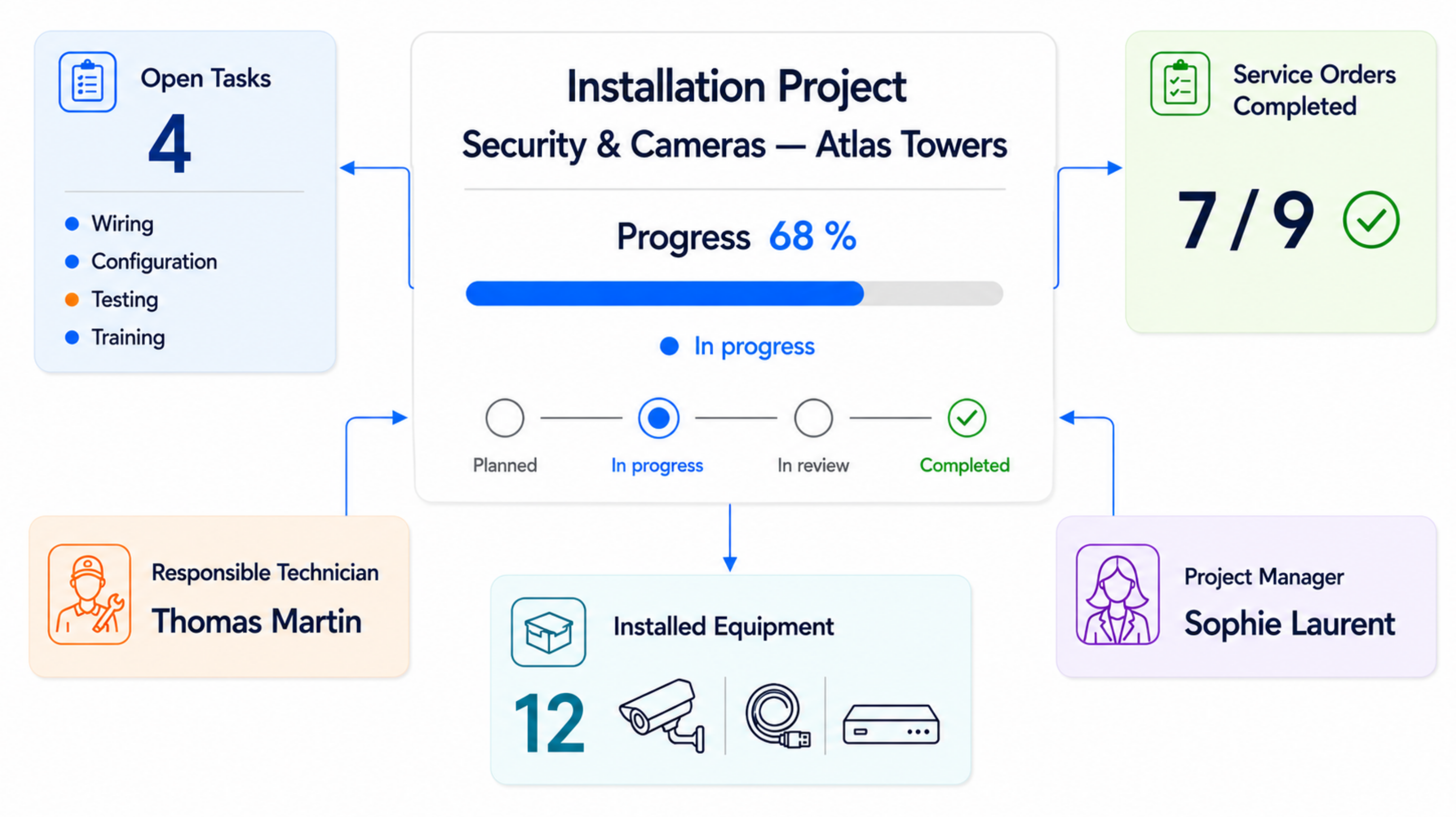
Manage progress, open tasks, technicians, service orders and installed equipment in one clear project view. Everyone knows what is completed, what remains open and who is responsible.
- Live project progress
- Tasks and responsibilities centralized
- Service orders connected to the project
- Installed equipment recorded
Project management
One clear view for every project, task and responsible person
See active projects, open tasks, deadlines, assigned team members and the complete project timeline. Managers immediately know where follow-up is required.
- Active, completed and delayed projects
- Open tasks and assigned team members
- Clear progress for every project
- Timeline with important milestones
- Deadlines and delays immediately visible
12
active projects
34
open tasks
8
completed
2
overdue
Projects
HVAC Installation — Antwerp
68%AssigneeThomas Martin
Due date15 Aug 2026
Electrical Panel — Brussels
35%AssigneeSophie Renard
Due date2 Sep 2026
Emergency Lighting — Leuven
10%AssigneeJulie Dubois
Due date30 Sep 2026
Project timeline
- Planned1 May 2026
- Installation15 June 2026
- Delivery15 Aug 2026
Deadlines & project billing
Keep planning, budget and billing connected
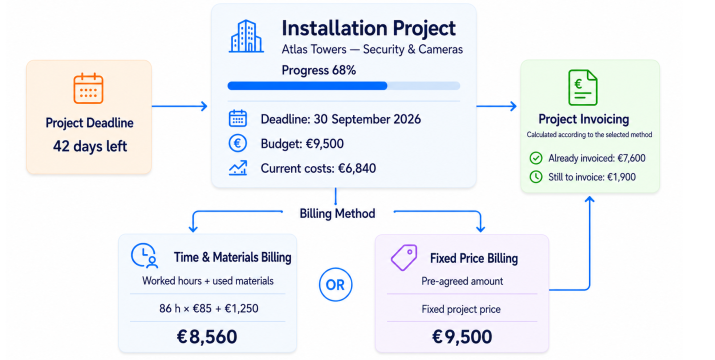
Track each project's deadline, budget, current costs and already invoiced amounts. Use time-and-material billing or an agreed fixed project price.
- Project deadline and remaining time visible
- Budget and current costs compared
- Hours and materials recorded correctly
- Fixed-price billing supported
- Invoiced and remaining amounts visible
From project start to delivery
Keep every step connected in one project workflow
From the initial plan to the final service order and invoicing, all information stays linked to the same project.
- 1Create the projectRecord the customer, location, scope, deadline and budget.
- 2Assign tasksAssign work to managers, employees and technicians.
- 3Complete the installationTrack execution and register installed equipment.
- 4Follow service ordersConnect interventions and completed work to the project.
- 5Monitor progressTrack open tasks, milestones, costs and deadlines.
- 6Deliver and invoiceComplete the project and prepare the recorded information for invoicing.
Project management for service companies: did the job actually pay?
On a two-hour call-out you feel immediately whether it paid. On a three-week job with four people, extra work and a late supplier, nobody feels it any more — and the margin only shows up at the final account, or not at all.
Hours captured where the work happens
Technicians record hours against the project or task they are working on, from their phone, along with travel and materials used. Time entered back at the office in the evening is an estimate; this is not.
Those same hours feed the costing, so nothing has to be entered twice to know where you stand.
Estimated against actual, during the job
Per project or phase, estimated and actual hours, materials and subcontracting sit side by side. A project that has burnt its budget halfway shows it halfway — not on the final invoice.
It is also what improves the next quotation: you price on what comparable work actually cost, not on what you assumed at the time.
Time and material, fixed price, and the zone between
Many jobs are neither cleanly: a fixed price with extra work billed by the hour. Both are tracked separately on the same project, so the extra stays billable instead of dissolving into the fixed price.
Who this matters to
- Installers running multi-day projects alongside service work
- Businesses using subcontractors who need their cost per project
- Teams whose technicians switch between projects and call-outs
Frequently asked questions about projects and hours
Can technicians record hours on site?
Yes. Hours are recorded on the phone against the project or task being worked on, together with travel and materials used.
Can we see mid-project whether the budget holds?
Yes. Estimated and actual hours, materials and subcontracting sit side by side per project or phase, so an overrun is visible while the work is still running.
How is extra work on a fixed price handled?
It is recorded separately on the same project, which keeps it billable instead of letting it disappear into the fixed price.
Bring your service operations together in one system
Discover how Service Suite fits your team, workflow and growth plans.